
Transparency Note: This article contains affiliate links. If you purchase through these links, I may earn a commission at no extra cost to you. This supports my data-driven analysis. I only recommend tools I believe add value.
Short-form video content is now dominating on social media platforms like YouTube, Instagram Reels, TikTok, and Facebook because AI video tools are becoming most popular. Every day, multiple AI video tools are launching and promising you for faster editing, AI captions, automation, and one-click content creation.
However, after personally testing multiple Best AI Video Tools, I realized that many tools perform differently once i start using them in a real workflow.
Some platform limited their editing flexibility and focus more on automation. Another platform offers you more customization but requires manual work to publish content on social media.
That is why, after testing multiple AI video tools, I decided to create this detailed comparison article rather than give you individual product reviews.
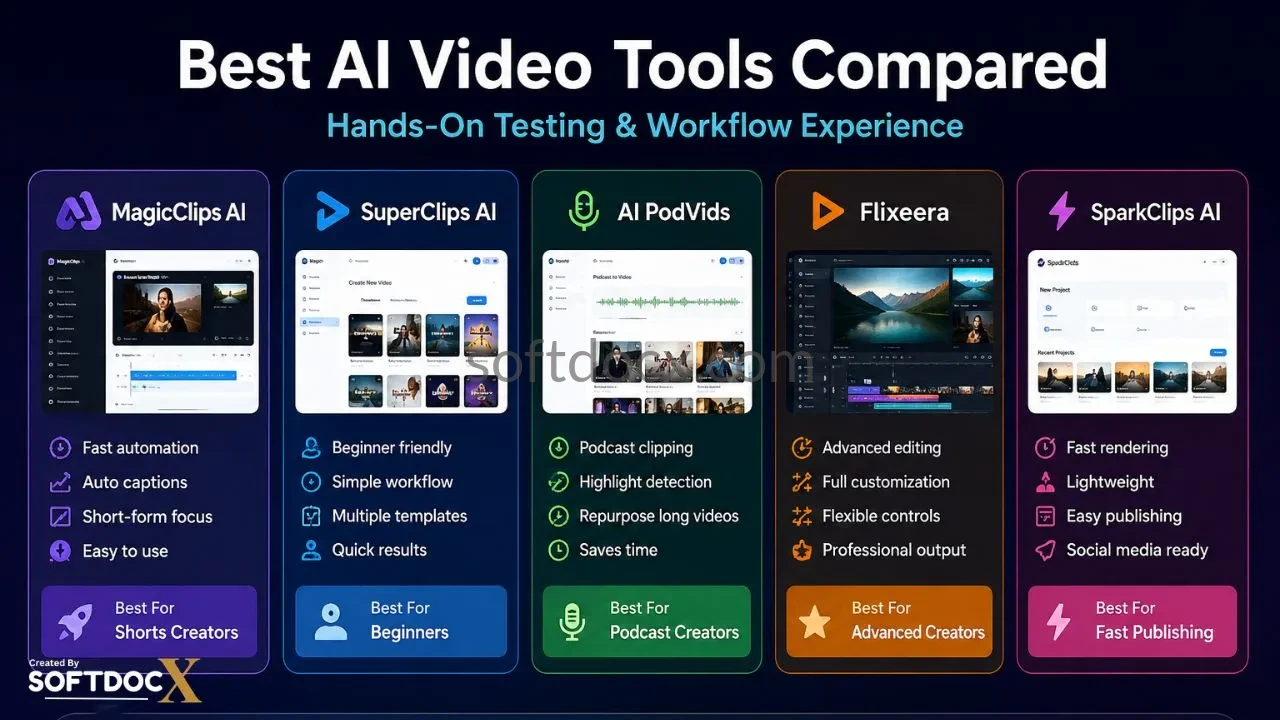
For this comparison, I explored platforms including AI PodVids, MagicClips AI, SuperClips AI, Flixeera, and SparkClips AI. I have explored product dashboards, generated short-form videos, tested multiple captions, checked export quality, and analyzed how practical these tools perform.
In this article, my goal is not to say this tool is best or perfect for you. Instead, I’d like to show you the real workflow difference between multiple platforms.
Even if multiple tools are launching in the market, this article helps you to understand which platforms are genuinely helpful for your content creation.
Table of Contents
Why AI Video Tools Are Growing Rapidly
In today’s world, the demand for content creation continuesly increasing nearly every social media platform. However, traditional content creation requires technical skills, manual effort, and time.
This is why AI video tools are gaining attention right now.
Most of AI video platforms offer features like
- Automatic caption generation
- AI clipping
- Video resizing
- Social media formatting
- Subtitle styling
- AI-generated visuals
- Podcast-to-video conversion
- Template automation
- AI voiceovers
I noticed during testing that practical usability of the product matters more than features. When I explored products, some platforms offer a, huge list of features, but when I try to implement that feature, it feels difficult. Other platforms offer you fewer features, but they create smoother workflows.
After spending time on testing multiple platforms, I realized that workflow and output matter more than marketing promises.
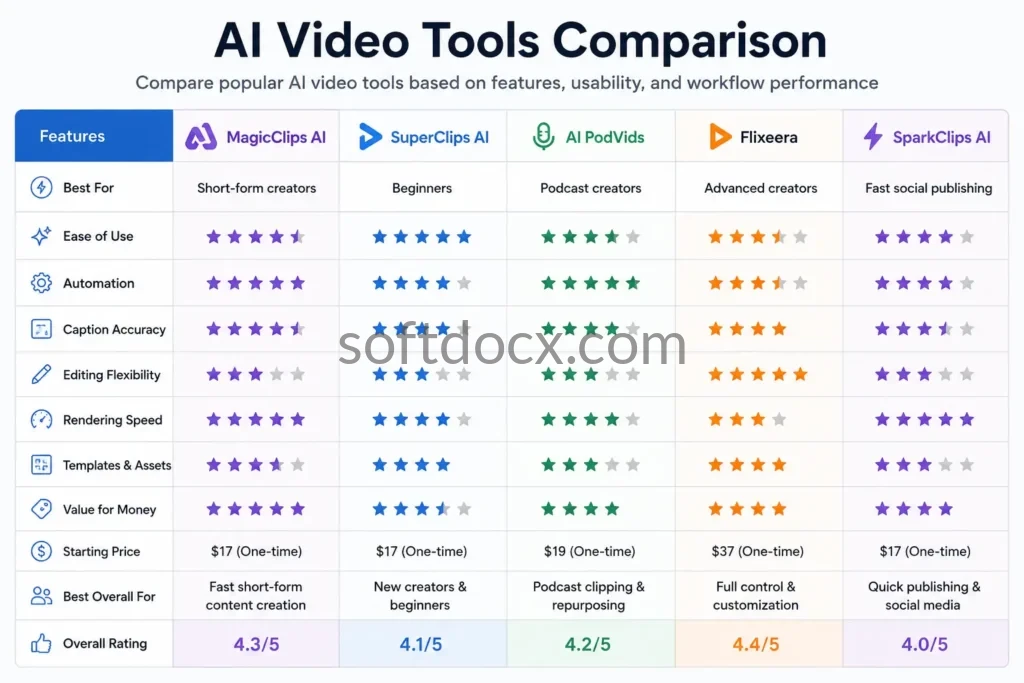
Quick Best AI Video Tools Comparison Table
| Tool | Best For | Main Strength | Main Weakness |
|---|---|---|---|
| MagicClips AI | Shorts creators | Fast automation | Limited customization |
| SuperClips AI | Beginners | Simple workflow | Repetitive templates |
| AI PodVids | Podcast clips | Automated clipping | Requires manual edits |
| Flixeera | Advanced creators | Editing flexibility | Slight learning curve |
| SparkClips AI | Fast publishing | Quick rendering | Basic editing tools |
My Personal Testing Process
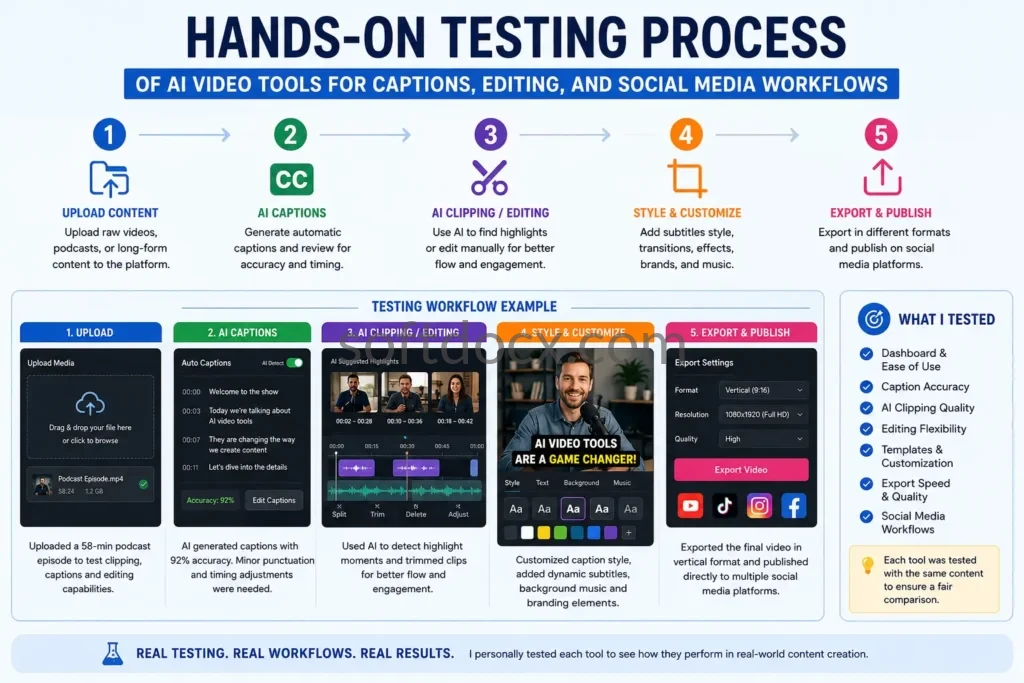
Before writing this comparison article, I have personally tested these platforms to see how they perform in real content creation workflows.
I am not relying on product claims. I uploaded:
- short-form videos
- podcast clips
- voice content
- social media content
- promotional material
To test:
- workflow speed
- dashboard usability
- export quality
- caption accuracy
- rendering speed
- editing flexibility
- automation consistency
During testing, one thing I noticed is that no AI video tools can completely replace manual editing or decision-making.
Most of the platforms work better than a full replacement of editing software, which does not require human help.
Read My Article How to Spot Fake Software Review.
What Makes a Good AI Video Tool?
After spending time on these AI video platforms, I realized that the best video content creation platforms are not necessarily the ones with more features.
Instead, the most useful tools are thise who delivers the quality output, provide you flexibility and full control.
Here is the list of my factors during testing.
1. Workflow Simplicity
A good AI video tool should reduce editing complexity instead of adding more features.
Some dashboards have unnecessary options, while others felt smooth and beginner-friendly platforms.
For creators, the simplicity of the dashboard is more important for creating content.
2. Caption Accuracy
Captions are now important for short-form content.
During testing time, i realize that some tools generated accurate captions, while others required multiple manual corrections and editing tasks.
Reduces the overall benefit of automation if you have poor caption quality.
3. Editing Flexibility
Creators need control over:
branding
transitions
text placement
visual styling
timing adjustments
some platforms specialy focuses on AI features that create flexibility.
4. Export Speed
To create a quick output, fast rendering is important.
Some tools perform well during editing but slow down during export.
And this part becomes frustrating for creators to manage their publishing schedule.
5. Output Quality
A very important factor in creating content is output quality.
I have tested different types of output formats to see how professional video looks when we uploaded on social media.
1. MagicClips AI – My Experience
When I tested MagicClips AI, the first step i noticed that workflow and speed. The platform feels very user-friendly and feels like specially designed for creators. It is helpful for creators who produce short-form content.
I tested caption generation, transition, and export by uploading short-form content. The AI caption features work well, although some parts require manual corrections.
The platform reduces repetitive task that why it feels simple and easy to use.
After generating multiple engaging videos, I realized that the customization feature felt limited compared to other advanced tools.
What I liked
- Fast automation
- Beginner-friendly dashboard
- Good short-form workflow
- Simple content generation process
What Needs Improvement
- Limited editing flexibility
- Basic customization
- Some repetitive templates
Best For
Creators focused on fast short-form publishing.
2. SuperClips AI – My Experience
SuperClips AI looks simple and more beginner-friendly. During testing, the automation workflow is very smooth and easy to navigate the features.
I have explored multiple templates and tested short-form content workflows. This platform can handle social media content very well. But after using the platform, I feel like some templates started showing repetitive. That’s why some content wants flexibility to create content.
It is suitable for beginners to generate content and comfortable workflow.
What I Liked
Easy learning curve
Beginner-friendly interface
Smooth dashboard experience
Fast social content creation
What Needs Improvement
Repetitive design templates
Less advanced customization
Limited branding flexibility
Best For
Beginners and casual creators.
3. AI PodVids – My Experience
AI PodVids focuses more on podcast-style content rather than any traditinal short form clips.
During testing, I uploaded the long-form podcast content and explored how this platform effectively creates viral clips for social media platforms.
The clips feature can automatically reduce manual work, especially on identifying engaging content in long form vidoes.
However, some features still require manual editing work. I noticed that specially caption formatting needs some improvement. But overall, it can definitely help users to create engaging podcast content.
What I Liked
Useful podcast clipping workflow
Saves time for repurposing
Social-ready formatting
Helpful automation tools
What Needs Improvement
Some clips require manual cleanup
Caption formatting inconsistencies
Context selection not always perfect
Best For
Podcast creators and long-form content repurposing.
4. Flixeera – My Experience
Flixeera provides you different experience compared to other automation platforms.
This platform have more editing flexibility and customization options. This helps creators to create content according to their requirements.
During testing the product i noticed that the workflow felt more advanced and required time to understand properly.
After testing different types of content, this platform offers more control over your content, but it requires more involvement from users side.
What I Liked
Better customization options
Flexible editing workflow
Multiple content formats
More advanced controls
What Needs Improvement
Slight learning curve
More complex interface
Less beginner-friendly
Best For
Advanced creators want stronger customization.
5. SparkClips AI – My Experience
SparkClips AI focuses on workflows and their content creation speed.
During testing, the content rendering process felt quick and easy. The dashboard is easy to use and smooth. The workflow is optimized according to users who want quick content creation.
But compared to other advanced platform this felt like need improvement in editing flexibility. It is better for beginner but advanced users need stronger editing tools and features.
What I Liked
Fast rendering speed
Lightweight workflow
Easy publishing process
Quick automation setup
What Needs Improvement
Basic editing system
Limited creative flexibility
Fewer advanced features
Best For
Fast-paced social content publishing.
Which AI Video Tool Is Best for Different Users?
Different creators have different working requirements.
That means the best AI video platform depends on what content we create and what type of flexibility the platform gives us.
| User Type | Recommended Tool |
|---|---|
| Beginners | SuperClips AI |
| Fast Shorts Creation | MagicClips AI |
| Podcast Creators | AI PodVids |
| Advanced Editing | Flixeera |
| Fast Social Publishing | SparkClips AI |
What I Learned After Testing Multiple AI Video Tools
After testing and exploring multiple AI video tools, I realized that many tools focus heavily on automation, rather than workflow efficiency.
Most AI video platforms require:
- manual review
- creative adjustments
- branding improvements
- editing corrections
Automation in workflow can definitely reduce repetitive work, but users still need guidance for the final output.
I also noticed that beginner users prioritize simple and easy-to-use platforms, while advanced users focus on flexibility and customization.
The right content strategy eavily depend on workflow and the right approach.
Who Should NOT Use AI Video Tools?
AI video tools may not be suitable for regular users who:
- Need cinematic-level editing precision
- Prefer complete manual creative control
- Already use professional editing software comfortably
- Produce highly customized commercial video projects
- Expect perfect one-click automation
Final Verdict
After personally testing multiple AI video tools, I found that each platform performs differently depending on workflow, editing, and content goals.
For creators, MagicClips AI works well with automation. SuperClips AI provides you with a beginner-friendly workflow. For long-form content, AI PodVids helps podcast creators. For advanced creators, a Flixeera offers flexibility. SuperClips AI offers you speed and a rapid publishing content workflow.
No AI video tools can completely replace human touch. But when you use corretly some tools have defineltly do better and reduces repetative work.
In my experience, the best AI video tool is not tons of features; it is one that gives you quality output and a smooth content workflow. It helps you to create content without any additional editing complexity.

My name is Sharad Tekawade. I am a professional Data Analyst and MBA graduate specializing in Business Analytics, with over 5 years of experience in the software and marketing space. I founded SoftDocx to cut through the AI hype and provide strategic, hands-on reviews and Tech Updates that focus on real business ROI. Every software featured on this site undergoes my personal testing to ensure it meets the quality standards required for modern business growth and data-driven ROI.